Treatment Planning Is the Practice: Why the Paperwork Is Not an Afterthought
Every practice I have worked in has had the same quiet leak. Not the schedule, not the hygiene column, not collections. The treatment plan. A patient sits in the chair, hears what they need, nods, and leaves with either nothing in their hands or a printout that reads like a receipt. Two weeks later they cannot remember whether the crown was urgent or optional, what it costs, or why the dentist said it mattered. They do not book. Nobody records a loss, because nothing was ever booked to lose.
Treatment planning is not the sheet of paper. But the sheet of paper is where the plan either survives contact with the patient’s real life or quietly dies.
I built a tool to fix the part I could actually fix. It is called DentalForms Desktop, it runs on Windows, it is free, and it is a single 1.9 MB file with no server behind it.
One thing before you click that. Windows is going to warn you about it. You will get a blue SmartScreen box that says “Windows protected your PC” and “Microsoft Defender SmartScreen prevented an unrecognised app from starting,” and the only obvious button will be Don’t run. To install it anyway, click More info and then Run anyway.
I would rather explain that than have you quietly assume the file is malware. The warning is not detecting anything wrong with the app. It appears because I have not paid for a code signing certificate, and because not many people have downloaded this yet. That is genuinely all SmartScreen is measuring: whether the binary carries a certificate from a vendor Microsoft recognises, and whether it has enough of a download history to have earned a reputation. A brand new unsigned app from a small publisher trips it every time, no matter what is inside.
Now, you should not simply take my word for that, and here is the part I mean sincerely. The correct instinct when an unknown .exe from the internet asks you to click past a security warning is suspicion, and I am not going to talk you out of it, because that instinct is the one that keeps ransomware off a practice server. If you are not comfortable, do not install it. If you have an IT person, send it to them first. Upload it to VirusTotal and let 70 engines look at it. Install it on one front desk machine and watch it for a week before it goes anywhere near the rest of them. All of that is the right way to treat software you did not write, including mine.
This post is half clinical and half technical, because the two are not separable here. The file format you choose is a treatment planning decision. Whether a letter can be edited six months later without falling apart is a treatment planning decision. Whether the thing you attach to a claim renders the same on the reviewer’s screen as it did on yours is very much a treatment planning decision, and it is one that gets made by accident in most practices.
So: what proper treatment planning requires first, then what I built and why it is built that way.
What a treatment plan is actually for
A treatment plan has three audiences, and most plans are written for only one of them.
The patient. They need to understand what is wrong, what you propose to do about it, what happens if they wait, and what it costs. In that order. A plan that leads with a dollar figure is a quote, not a plan. A patient who understands the consequence of waiting makes a different decision than a patient who is comparing two numbers.
The insurer. They need to see that the clinical findings justify the procedure code, in writing, with the supporting documentation travelling alongside it. I have written at length about what gets extra scaling units approved under the CDCP, and the lesson generalizes to every predetermination you will ever send. The reviewer is not evaluating the patient. They are evaluating the file. If the severity is in the dentist’s head and not in the envelope, it does not exist.
The chart, and the person reading it in three years. That might be an associate who has never met the patient. It might be a lawyer. It might be you, having forgotten completely. A plan that records what was proposed, what was declined, and what the patient was told about the consequence is the difference between a defensible file and a story you tell from memory.
Most paperwork failures I see are one plan trying to serve all three audiences and serving none of them properly.
Why the paperwork actually breaks
It is almost never that the clinical team does not know what to do. It is friction. Specifically:
The forms live in too many places. A Word file on the front desk machine. A photocopied master in a filing cabinet. A PDF someone downloaded from an insurer three years ago that may or may not be the current version. Whichever one is closest to hand is the one that gets used.
Every letter is a copy-paste from the last patient. This is the big one. It is also how the previous patient’s name ends up in the body of the letter, how a stage III rationale gets attached to a stage I case, and how narrative that was specific once becomes generic through reuse. I have seen predeterminations go out describing the wrong tooth because the template was another patient’s finished letter.
The rationale is the first thing dropped when it is busy. Writing out why this patient needs this treatment takes four minutes. Four minutes on a full day is a real cost, so it gets skipped, and the request goes out saying the patient needs the treatment without saying why. That request gets rejected, which costs the practice far more than four minutes.
Nothing is consistent, so nothing is auditable. If every letter is bespoke, you cannot look at last quarter’s predeterminations and ask what the rejected ones had in common. There is no pattern to find because there is no pattern.
Consistency is not a bureaucratic virtue. It is what makes the work reviewable, and reviewable work is what improves.
What the tool does
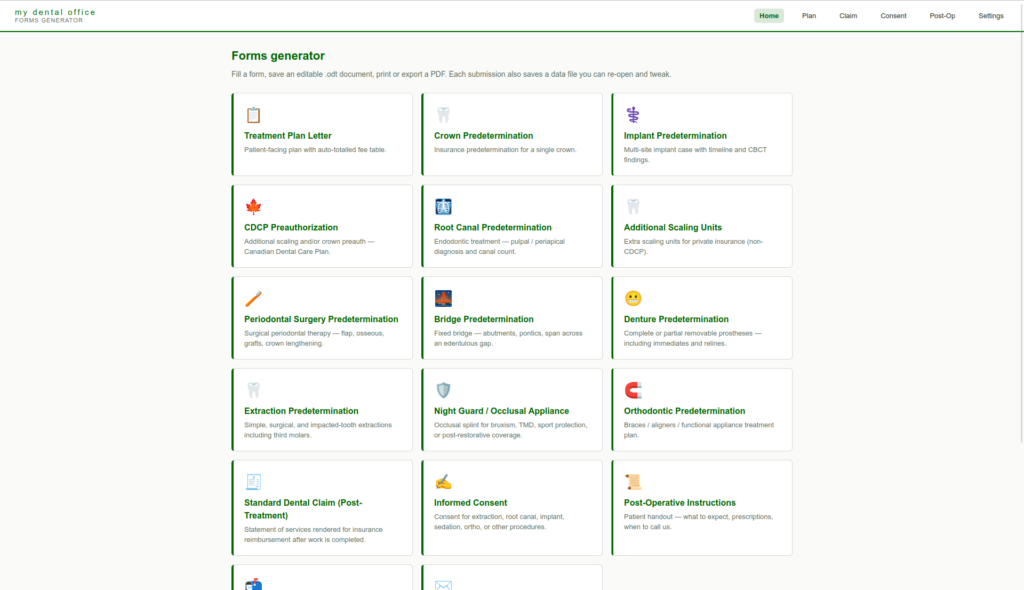
DentalForms Desktop generates 17 kinds of dental paperwork from structured input. You fill in the fields once, it produces the document, and the document is an editable OpenDocument file (.odt) that opens in Word, LibreOffice, or Google Docs, or a printable page you can send straight to the printer or save as PDF.
Here is the full list.
The plan itself
- Treatment Plan Letter. The patient-facing document, with an auto-totalled fee table.
Predeterminations, one form per procedure family, because a crown case and an implant case do not need the same information written down:
- Crown Predetermination. A single crown.
- Implant Predetermination. Multi-site cases, with timeline and CBCT findings.
- Root Canal Predetermination. Pulpal and periapical diagnosis, canal count.
- Periodontal Surgery Predetermination. Flap, osseous, grafts, crown lengthening.
- Additional Scaling Units. Extra scaling units for private insurance, not CDCP.
- Bridge Predetermination. Abutments, pontics, span across the edentulous gap.
- Denture Predetermination. Complete and partial removable, including immediates and relines.
- Extraction Predetermination. Simple, surgical, and impacted teeth including third molars.
- Night Guard / Occlusal Appliance. Bruxism, TMD, sport, post-restorative coverage.
- Orthodontic Predetermination. Braces, aligners, functional appliances.
Canadian Dental Care Plan
- CDCP Preauthorization. Additional scaling and/or crown, under CDCP rules.
Everything around the treatment
- Standard Dental Claim (Post-Treatment). Services rendered, for reimbursement after the work is done.
- Informed Consent. Extraction, root canal, implant, sedation, ortho, and others.
- Post-Operative Instructions. The patient handout. What to expect, prescriptions, when to call.
- Recall Letter. Patients due for their next routine exam.
- Referral Letter. To perio, OMFS, prostho, pediatric, or oral medicine.
One thing to be clear about, because it affects how you should use these: the forms are carrier-generic, except the CDCP ones. They are not modelled on any one insurer’s criteria, and they do not pretend to know what Sun Life wants that Manulife does not. What they do is make sure the clinical picture is written down completely and in the same shape every time. The CDCP forms are the exception, because the CDCP publishes its criteria and I built to them.
That split is deliberate. A form that claims to know every carrier’s private rules is lying to you, and it will be wrong within a year of shipping. A form that captures the case properly is right regardless of who reads it.
And you can go back into a saved form and edit it. Every filled form is saved and can be reopened, changed, and regenerated. This sounds small. It is not. The patient calls back and wants the treatment split into phases, or the carrier comes back asking for one more finding, and you open the case, change the two fields that changed, and generate again. You are not retyping the whole thing from the last version, which is exactly the moment when the previous patient’s name usually survives into the new letter.
Two outputs, and they are for different jobs
This is the part I want to spend real time on, because it is where most forms tools get it backwards. Every document the app produces comes out in one of two shapes, and choosing correctly is most of the value.
ODT, for the document that is still alive
The editable output is an OpenDocument Text file, a .odt. It is an ISO standard, I did not invent it, and it belongs to nobody. It opens in Microsoft Word and in Google Docs, and it is the native format of LibreOffice.
Here is why that matters more than it sounds. An .odt file is, underneath, a ZIP archive full of XML. That is the entire secret. It means a document is data, not a picture of data. The app opens the template archive, walks the XML, fills the tables, ticks the checkboxes, marks the teeth on the dental chart, drops in your practice logo, and rezips it. No Word automation, no LibreOffice running in the background, no server, no vendor API in the middle.
The practical consequence for you is that the letter that comes out is a real document with real structure. Headings are headings. The fee table is a table. If the patient calls and wants the bridge broken into two phases, you open the file, edit the two lines that changed, and everything else stays exactly where it was. You are not fighting a PDF, and you are not rebuilding the letter from scratch, which is where the copy-paste errors come from in the first place.
That is the trick to consistency, and it is worth naming plainly. Consistency does not come from everyone being disciplined. It comes from the boring parts of the document being untouchable and the clinical parts being easy to change. The template owns the structure. You own the words that matter.
You do not have to use my app to use the documents
This is the part I want to say out loud, because it is the difference between a tool and a trap.
Here is the sequence, because it matters. Nothing is written to disk until you ask for it. You fill in the form, you hit generate, and the app asks you where to put the file. You choose the folder and the filename, the same as saving anything else. It does not scatter documents into a hidden application directory and leave you hunting for them later, and it does not decide on your behalf that everything belongs in one big pile.
That is worth a sentence because it is the difference between the document being yours and the document being the app’s. Put it straight into that patient’s folder on the server, or wherever your practice already keeps this paperwork, and it lives inside the filing system and the backup routine you already have. The app does not need to know your filing structure and I did not want it to.
From that point on the app is out of the loop entirely. You can close it and never open it again. The document is a normal file on your machine. Open it in LibreOffice, change anything you like, save it, print it, export it as a PDF from the File menu, keep it in your patient folder. LibreOffice Writer does all of that, and it does it with no licence, no subscription, no account, and no seat count. It runs on Windows, macOS, and Linux. For a practice that is already paying for enough software, that is a real line item that does not need to exist.
So there are two honest ways to work here, and both of them are fine:
- Use the app for the whole loop. Fill the form, generate, save the case, and reopen it in the app later to change it and regenerate. You get the structure and the auto-totalled fee table for free every time, and the saved case is there next year.
- Use the app once, then live in LibreOffice. Generate the document to get the bones right, then treat the
.odtas the working file from that point forward and edit it like any other document.
The first way keeps you more consistent, because the form is what enforces the structure. The second way is completely legitimate, and I am not going to pretend otherwise to keep you inside my software.
That is deliberate. A forms tool that produces files only it can read is not saving you work, it is taking your documents hostage. If I stop maintaining this app tomorrow, or you decide you hate it, every document it ever made still opens in three different office suites and one of them is free forever. That property is worth more than any feature I could have added.
The 17 templates are ordinary .ott template files with tokens in them. Your practice name, address, and logo are not hardcoded anywhere in the app. They live in a Settings screen and flow into every document, which is also why this tool has no practice’s branding baked in but yours.
PDF, for the document that is finished
The other output is a styled preview you print. Every operating system has “Save as PDF” sitting in the print dialog, so the app renders the document properly and hands it to that dialog. Print it on paper for the patient, or pick Save as PDF and choose where it goes. Same button, and the same principle as the ODT: you say where the file lands.
There is a second route to the same place, worth knowing if you have already edited the letter. Open the generated .odt in LibreOffice and use File, then Export as PDF. That is the better path when the document changed after it left the app, because you are exporting what you actually edited rather than regenerating from the form and hoping you made the same changes twice.
And the PDF is what you attach to an electronic claim. This is the one thing in this post I would underline twice.
When a treatment plan or a predetermination rationale goes out through your practice management software over ITRANS, the attachment should be a PDF. Not a .docx, not an .odt, not a photo of a printout taken on someone’s phone. There are good reasons for that and they are all boring:
- It renders the same everywhere. The reviewer sees the document you saw. An editable file re-flows depending on what opened it and which fonts that machine happens to have. Your carefully laid out fee table can arrive looking like something else entirely.
- It is fixed. An attachment is a record of what you sent on the day you sent it. That is the entire point of a record. An editable file is not evidence of anything in the same way.
- It is what the systems and the reviewers actually expect. PDF is the assumed attachment format across claim systems. Sending something else invites a technical rejection that has nothing to do with the clinical merits of the case, which is the most frustrating kind of rejection there is.
So the workflow is: generate, edit the ODT until the case is stated properly, then print to PDF and attach the PDF. The ODT is your working copy and your record for the chart. The PDF is what goes in the envelope.
I am not going to tell you where the attachment button is in your practice management software, because every system puts it somewhere different and I would get it wrong for most of you. Your software vendor is the right people to ask, and they will not guess.
The rest of the design decisions
It is one file you double-click. No server, no install steps, no IT person, no browser, no account. The Windows installer is 1.9 MB, which is not a typo. It is built on Tauri, which wraps a small Rust shell around the webview your OS already ships, instead of Electron, which bundles an entire copy of Chromium and lands you at roughly 100 MB for the same app. The trade-off is that rendering happens in whatever webview the machine has. For pixel-perfect graphics that would be a real concern. For forms it is nothing.
An earlier version of this system ran as a Flask web app that needed a server started before anyone could print a letter, and “start the server first” is a non-starter in a dental office at 8:40 in the morning. If a tool requires someone to maintain it, in a small practice it will eventually stop being maintained, and then it stops being used. Deleting the server was not a compromise. It was the feature.
Nothing leaves the machine. There is no cloud, no account, no sync, no telemetry. Under PHIPA and PIPEDA, every service a patient’s information passes through is a thing you are responsible for. The simplest way to be responsible for zero of them is to have zero of them.
There are two separate piles of data here and it is worth keeping them straight, because they get backed up differently:
- The documents you generate go wherever you told the save dialog to put them. That is under your control, in your filing system, covered by whatever backup already protects that location.
- The saved cases are the app’s own copies, so you can reopen a form and edit it later. Settings are one JSON file, and each saved form is its own JSON file in the app’s data folder on that computer, and nowhere else.
That second pile is the one people forget, and it does contain patient information. It is plain files in a folder, so backing it up is copying that folder, and wiping it is deleting that folder. No database, no export tool, no vendor to ask. A backup and retention story you can explain to a regulator in one sentence is worth more than one that needs a diagram.
The output is editable, not locked. The tool produces a document, not a final answer. Clinical judgment belongs to the clinician, and any letter it generates is a starting draft you read, correct, and sign. It is a floor for consistency, not a ceiling on thought.
It was verified against a real office suite, not just against itself. 89 automated tests cover filling every template with sample data and round-tripping every form, which proves the code does what I told it to do and nothing more than that. The check that actually mattered was handing all 17 generated files to LibreOffice and confirming it opened and converted every single one to PDF without complaint. A malformed .odt is still a perfectly valid ZIP file, so a test suite will happily tell you everything passed while the document refuses to open on the front desk’s computer. The last mile is the only mile that counts.
What it does not do
I would rather you know this before you download it than after.
It is not a practice management system. It does not talk to Open Dental, AbelDent, or anything else. It does not read your chart and it will not populate itself from your patient record. You are typing the information in.
It does not submit anything. Claims and preauthorizations go out through your practice management software’s ITRANS digital claim system, with the attachments sent electronically the same way. This tool produces the document that travels with the submission. It does not send it, and it cannot approve it.
It does not approve anything, and neither do I. Approval rests with the carrier or with the CDCP, and only after a legitimate claim is submitted by an oral health provider. A well-documented request is not a trick or a workaround. It is the published guidelines followed properly, with complete current documentation attached. That is the entire method. It works because it is the actual rule, not despite it.
It is Windows only right now.
Where the four minutes go
Here is the honest accounting. The tool does not save you the four minutes it takes to write a proper rationale. It saves you the twenty minutes of finding the right form, the copy-paste, the name that did not get changed, the reformatting, and the second attempt after the rejection. The four minutes of clinical thinking are still yours, and they should be. That was never the part worth automating.
If you want to see the pattern this fits into, it is the same one every time: the clinical work was never the bottleneck. The conditions around it were. Fix the conditions and the work takes care of itself.
- Download DentalForms Desktop. Unsigned, so expect the SmartScreen warning. More info, then Run anyway.
- LibreOffice, if you want a free office suite to edit and save the documents in.
- CDCP Approval Checklist. Run a crown, scaling, or endo retreatment case through the criteria before you write the request.
If you use it and something is wrong, missing, or annoying, tell me. I would rather hear it than not.